
A free extension for finding field columns
One of my frequent Airtable frustrations is the inability to search for field collumns in the data view layout. All I want is to type in the name, and be taken to the collumn. The search bar will let you search for field names, and will take you to them if you are lucky, however if the word is anywhere else in the base it will take you to all of them first. Looking for a field named “Budget”? prepare to be taken on a journey of all 156 uses of the word “Budget” BEFORE you get taken to your field. There are 2 solutions to this that I can think of.
- You create a new view and quickly hide all fields, and show the field you are looking for. This works well as the search in the hide fields dropdown is excellent. HOWEVER this doesn’t take you to the field you want IN the view you are working in which is what we really want.
- We create our own exention that will give us the search bar we want!
How to use the extension
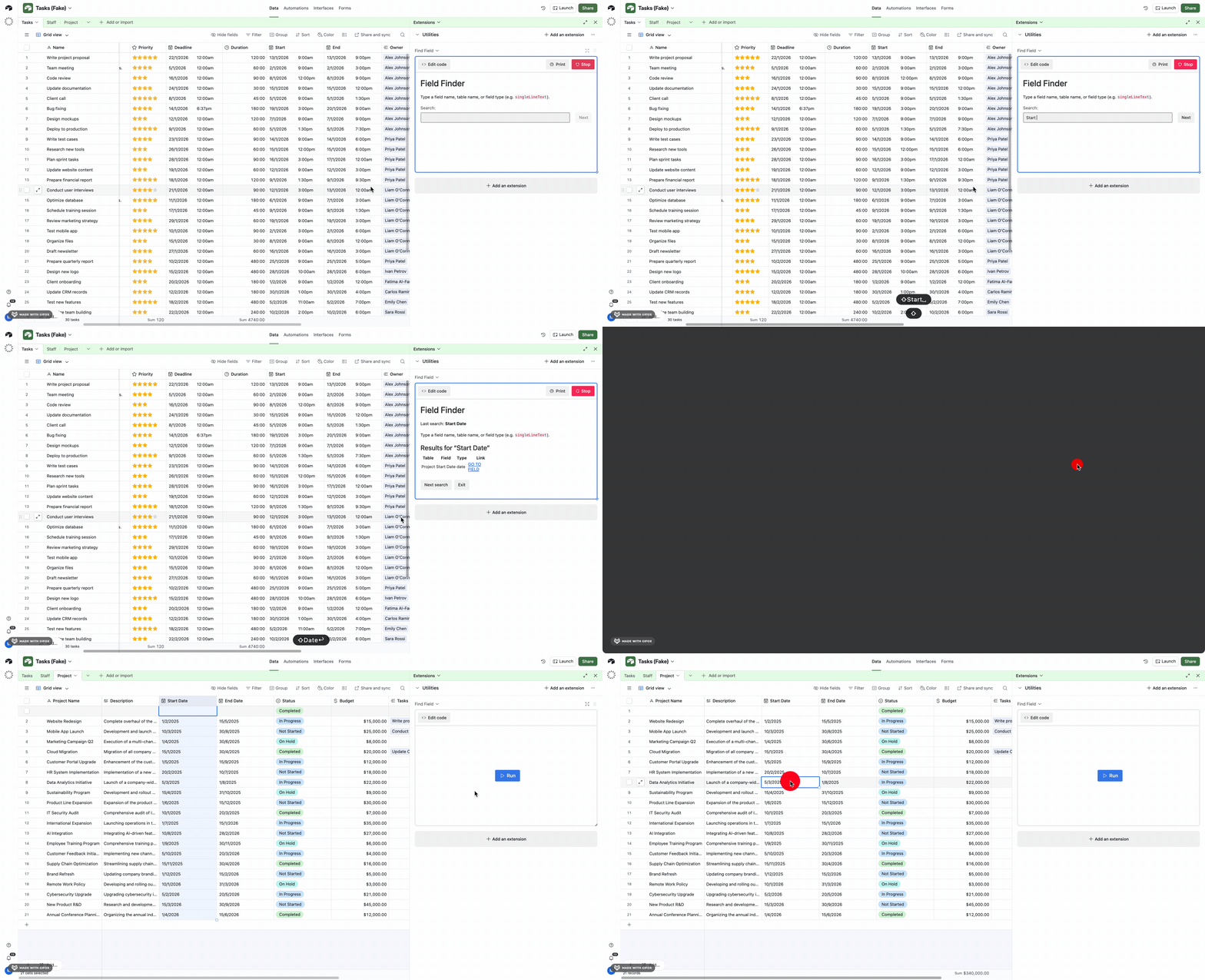
Create a new script module in extentions and paste this code into. Click “RUN”.
VIOLA – There you go. If you need more information than that. See the video below.
const appId = base.id;

function escapePipes(text) {
    return String(text).replace(/\|/g, "\\|");
}
function fieldUrl(appId, tableId, viewId, fieldId) {
    return `https://airtable.com/${appId}/${tableId}/${viewId}/${fieldId}`;
}

async function runSearch(queryRaw) {
    const query = (queryRaw || "").trim().toLowerCase();
    const results = [];
    if (!query) return { query, results };

    for (const table of base.tables) {
        const tableId = table.id;
        const viewId = table.views[0]?.id || "";

        for (const field of table.fields) {
            const match =
                field.name.toLowerCase().includes(query) ||
                table.name.toLowerCase().includes(query) ||
                String(field.type).toLowerCase().includes(query);

            if (match) {
                results.push({
                    table: table.name,
                    field: field.name,
                    type: String(field.type),
                    url: fieldUrl(appId, tableId, viewId, field.id),
                });
            }
        }
    }

    results.sort((a, b) =>
        a.table.localeCompare(b.table) ||
        a.field.localeCompare(b.field) ||
        a.type.localeCompare(b.type)
    );

    return { query, results };
}

function renderHeader(lastQuery) {
    output.clear();
    output.markdown(`# Field Finder\n`);
    if (lastQuery) {
        output.markdown(`Last search: **${lastQuery}**\n`);
    }
    output.markdown(`Type a field name, table name, or field type (e.g. \`singleLineText\`).\n`);
}

function renderResults(query, results) {
    if (!query) {
        output.markdown("### Enter a search term.");
        return;
    }
    if (results.length === 0) {
        output.markdown(`### No matching fields for “${query}”.`);
        return;
    }

    let md = `### Results for “${query}”\n\n`;
    md += `| Table | Field | Type | Link |\n`;
    md += `|-------|-------|------|------|\n`;
    for (const r of results) {
        md += `| ${escapePipes(r.table)} | ${escapePipes(r.field)} | ${escapePipes(r.type)} | [GO TO FIELD](${r.url}) |\n`;
    }
    output.markdown(md);
}

let lastQuery = "";

while (true) {
    // Make the top of the output consistent every loop
    renderHeader(lastQuery);

    // Prompt (this will appear as the next step in Airtable's UI)
    const query = await input.textAsync("Search:");
    lastQuery = query;

    // Show results
    renderHeader(lastQuery);
    const { results } = await runSearch(query);
    renderResults(query.trim(), results);

    // Next step: keep the loop going
    const action = await input.buttonsAsync(" ", [
        { label: "Next search", value: "next" },
        { label: "Exit", value: "exit" },
    ]);

    if (action === "exit") break;
}
Leave a Reply